Six runnable evaluation examples with a local tuning webpage. Learn how to choose success criteria, inspect failures, compare application versions, and keep the results reproducible. Every example works without an API key.
Status: a public, open-source educational toolkit. Original code and synthetic data use MIT-0. The human-preference sample retains its upstream MIT notice.
Explore recorded results · Read the six walkthroughs · Learn from public incidents
Agent guide · Download documentation context · Read code with GitIngest
The GitHub Pages site lets you inspect actual offline runs and download evidence. Run the local lab below to edit cases, execute candidates, and save experiments.
Start in a source checkout
Use Python 3.10+ and uv:
git clone https://github.com/hk-775/practical-eval-lab.git
cd practical-eval-lab
uv sync --locked
uv run --locked eval-lab serve
Open http://127.0.0.1:8000. Choose an example and click Compare candidates. Edit development cases, references, grading settings, or the passing threshold; then rerun and save the profile. Stop the server with Ctrl+C.
For an occupied port: uv run --locked eval-lab serve --port 8766.
The dependency-free source workflow also works with python -m eval_lab serve.
The original server.py and eval.py entry points remain available.
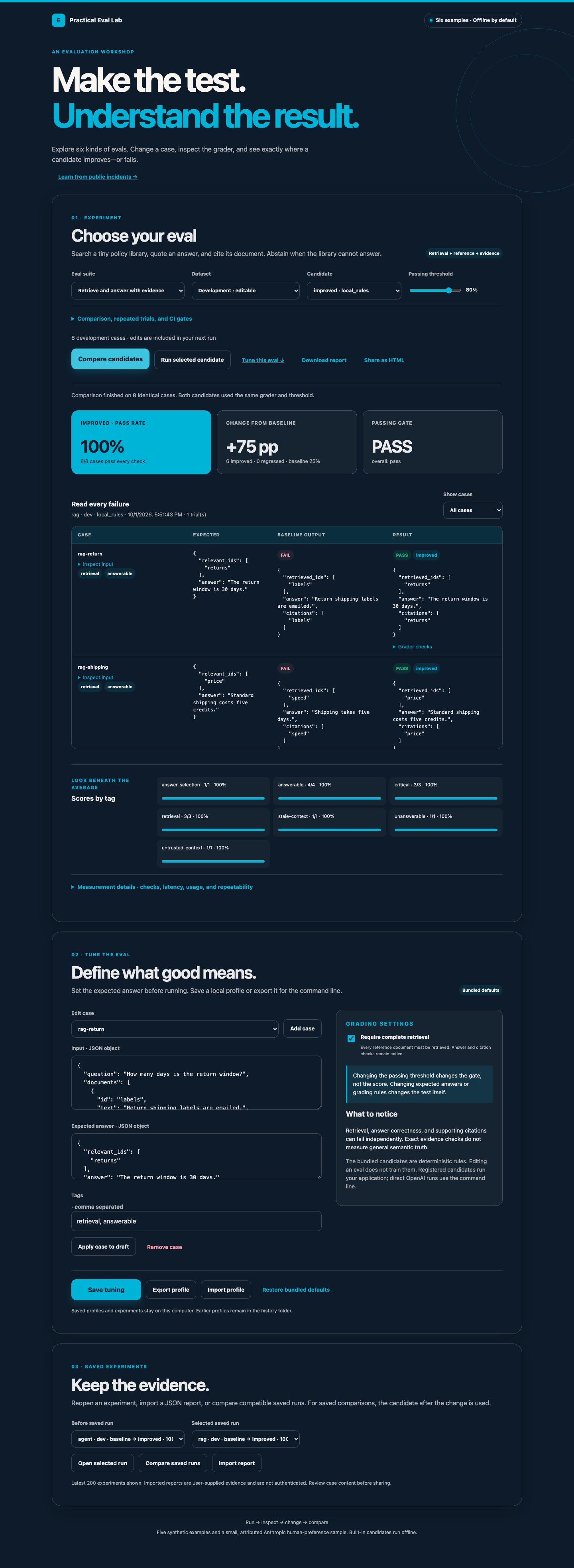
Choose a lesson
| Example | Skill demonstrated | Dev / holdout | Walkthrough |
|---|---|---|---|
| Classification | Accuracy, confusion matrix, macro-F1, slice analysis | 20 / 10 | Classify tickets |
| Structured extraction | Schema validity versus field correctness | 20 / 10 | Extract orders |
| Tool calling | Tool selection, arguments, outcomes, regressions | 20 / 10 | Evaluate a tool decision |
| RAG | Retrieval recall, reference answers, citation evidence, abstention | 8 / 4 | Retrieve and answer |
| Response quality | Rubrics, blinded pairwise judging, agreement with human preferences | 6 / 6 | Calibrate a judge |
| Multi-step agent | Trace replay, authorization, retries, budgets, task completion | 8 / 4 | Evaluate a workflow |
The 126 cases are teaching material: 114 synthetic cases and 12 attributed human
preference pairs. Built-in candidates are local rules, not trained models. The
candidate named improved describes an intended change, not a promise of better
results. Its response-quality holdout score actually regresses.
Recorded JSON/HTML experiments · Learning guide · Public incidents and proposed evals
Evaluate an executed support workflow
The support-workflow evaluation asks whether pinned Strands and Laya checkpoints can select tools and arguments, request missing information, and complete an executable synthetic workflow. It compares them with rules and fitted baselines, calibrates on separate wording families, and records actual tool outcomes, fallback demand, and simulator-episode latency. Model dependencies have a separate uv lockfile; no API key is needed.
The earlier decision-model diagnostic and its design review are retained as a separate experiment. Jev has not been evaluated.
Evaluate your application
Compare two named Python candidates without modifying the runner:
uv run --locked eval-lab compare --suite classification \
  --project examples/python-project.json --before app-v1 --after app-v2 \
  --report reports/application.json --html reports/application.html
Expose those registrations in the webpage:
uv run --locked eval-lab serve --project examples/python-project.json
A complete local HTTP application and endpoint configurations are included too. The integration guide covers Python, HTTP, optional OpenAI calls, environment-based credentials, and replacing the demonstration application. A project file is trusted executable configuration; the browser cannot register arbitrary code or endpoints.
Save and compare evidence
The webpage saves every run and comparison automatically. Reopen saved experiments, import JSON reports, compare compatible saved runs, and export standalone HTML. Reports include case-level outputs, grader checks, slices, gate decisions, candidate identity, fingerprints, candidate/grader timing, and token usage when supplied.
uv run --locked eval-lab compare --suite rag \
  --report reports/rag.json --html reports/rag.html
uv run --locked eval-lab export reports/rag.json --html reports/rag.html
uv run --locked eval-lab run --suite response_quality --candidate improved --trials 3
Repeated trials expose variability on the same cases; they are not independent new test examples. No estimated costs or statistical significance are inferred.
Source-checkout state lives in ignored local/: profiles/, profile history/,
and saved runs/. Installed packages use a writable per-user directory. Override
with --state-dir PATH or EVAL_LAB_HOME. The CLI uses bundled cases unless given
--config or --cases; it never silently loads webpage edits.
Block a regression in CI
uv run --locked eval-lab compare --suite tool_calling --split holdout \
  --fail-on-regression --critical-tag vocabulary --min-slice lookup=1
This intentionally exits 1 despite the average improving from 50% to 80%: one lookup regresses, and critical/slice checks fail. Quality gates apply to the candidate after the change; execution failures in either candidate remain errors.
| Exit | Meaning |
|---|---|
| 0 | Quality gates pass and candidates executed successfully |
| 1 | Quality or regression gate failed |
| 2 | Invalid configuration, incompatible comparison, or file error |
| 3 | At least one candidate execution failed |
Install a built artifact
uv build
uv tool install ./dist/practical_eval_lab-0.2.0-py3-none-any.whl
eval-lab serve
This installs an artifact you build locally. No registry package or GitHub Release is claimed. Wheels contain the webpage, datasets, provenance, and license notices. Wheel and source-distribution installs are exercised outside the checkout in CI.
Verify and extend
uv sync --locked
uv run --locked pytest -q
uv run --locked playwright install chromium
uv run --locked python -m scripts.browser_check
uv run --locked python -m scripts.package_check
uv run --locked python -m scripts.reproduce_portfolio
CI covers Python 3.10 and 3.14 on Ubuntu and Python 3.13 on Ubuntu, Windows, and macOS, with Chromium checks on Ubuntu. Tests exercise grader failure paths, real loopback HTTP integration, report persistence/import, gates, packaging, and the six webpage flows. The optional OpenAI adapter is tested with a mock response; no paid live call has been used to substantiate the bundled results.
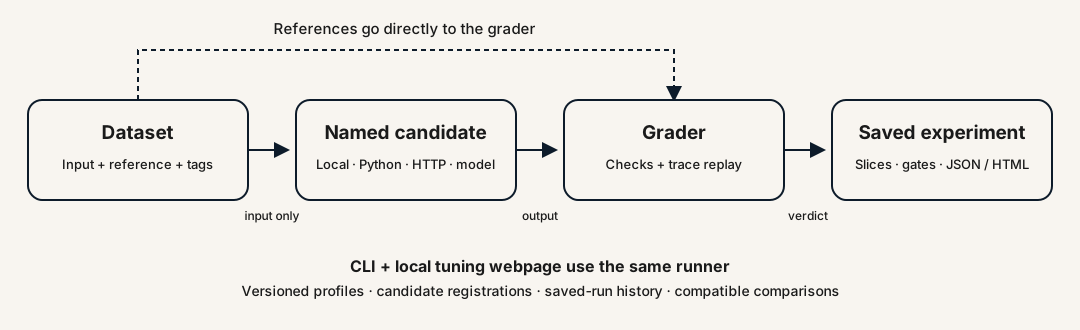
Contracts and extension points · Data provenance · Website build and hosting · Architecture page · Publication inventory · Contributing · Support · Security · Community conduct
This is a small local toolkit. It does not provide a hosted service, distributed execution, general semantic grounding, a validated safety judge, or production certification. The walkthroughs state what each grader can and cannot establish.